Touchscreen keypad
Welcome customers with your branding. Offer PIN and QR access at the same entrance.
Explore touchscreen keypad
The Bearbox system
Customer access. Unit protection. A clearer view of your operation.
App access, keypad access—or both. Explore the ways customers can get in, alongside the protection and tools your site needs.

A phone, a PIN or a QR code. Choose how customers identify themselves and which entrances they can open.
Welcome customers with your branding. Offer PIN and QR access at the same entrance.
Explore touchscreen keypadCustomers show a QR code on their phone or a printed card. Rotating codes refresh automatically, limiting how long a copied code can be used.
Explore QR access & QR SoloOpen permitted gates, doors and unit locks from a phone. Use app access alongside keypads and QR Solo readers, or run an app-only site without entrance readers.
Explore app accessRequire a second check before entry. A QR code and PIN can work together at one keypad.
Explore two-factor accessOpen the gate for authorised vehicles. Make repeat visits easier for customers who drive in regularly.
Explore numberplate recognitionChanging codes limit how long a saved photo or shared number remains useful. Keep familiar fixed codes or add temporary credentials to suit your site.
Customers show the current QR code on their phone. It refreshes automatically, so an old screenshot stops working when that code expires.
Explore QR accessUse an authenticator code as a second check at the keypad. Customers enter the current code from their authenticator app, which changes automatically.
Explore two-factor accessA temporary PIN for customers who prefer typing a code to scanning. They see the current code in the Bearbox app or your own app and enter it on the keypad before it expires.
Explore the keypadYou can keep using fixed PINs and QR codes, including printed QR codes. We recommend dynamic codes for stronger protection and a reduced risk of code reuse.
Entry permission is only part of the picture. Control where customers go and use unit monitoring to understand activity inside the site.
Alarms along the customer’s permitted route disarm for their visit. With BearLock, their unit unlocks too. Other areas stay protected, and protection returns when the visit ends.
Explore automatic unit locksLet customers open their own unit with the access they already use at your site. Link the lock to their permissions, so unit access stays with the people who should have it.
Explore automatic unit locksDoor contacts show when doors open. Movement sensors, also called PIRs, detect activity inside and outside units. Review unexpected openings and doors left open alongside access records.
Explore unit & site monitoringGive each person access to the areas they need, during their permitted hours. Keep other corridors, floors and buildings restricted.
Explore access zonesSend configured alarm events to your team or a connected alarm monitoring service, so the right people can investigate and respond.
Explore alarm alertsCheck live camera views alongside access and alarm activity. See what’s happening so your team can decide what needs a response.
Explore CCTV & videoConnect site alarms with CCTV monitoring through a partner such as DSOC. Their monitoring team can review camera views, investigate events and follow the response agreed for your site.
See live activity and manage customer access from your phone or desktop. Connect the software your team uses every day.
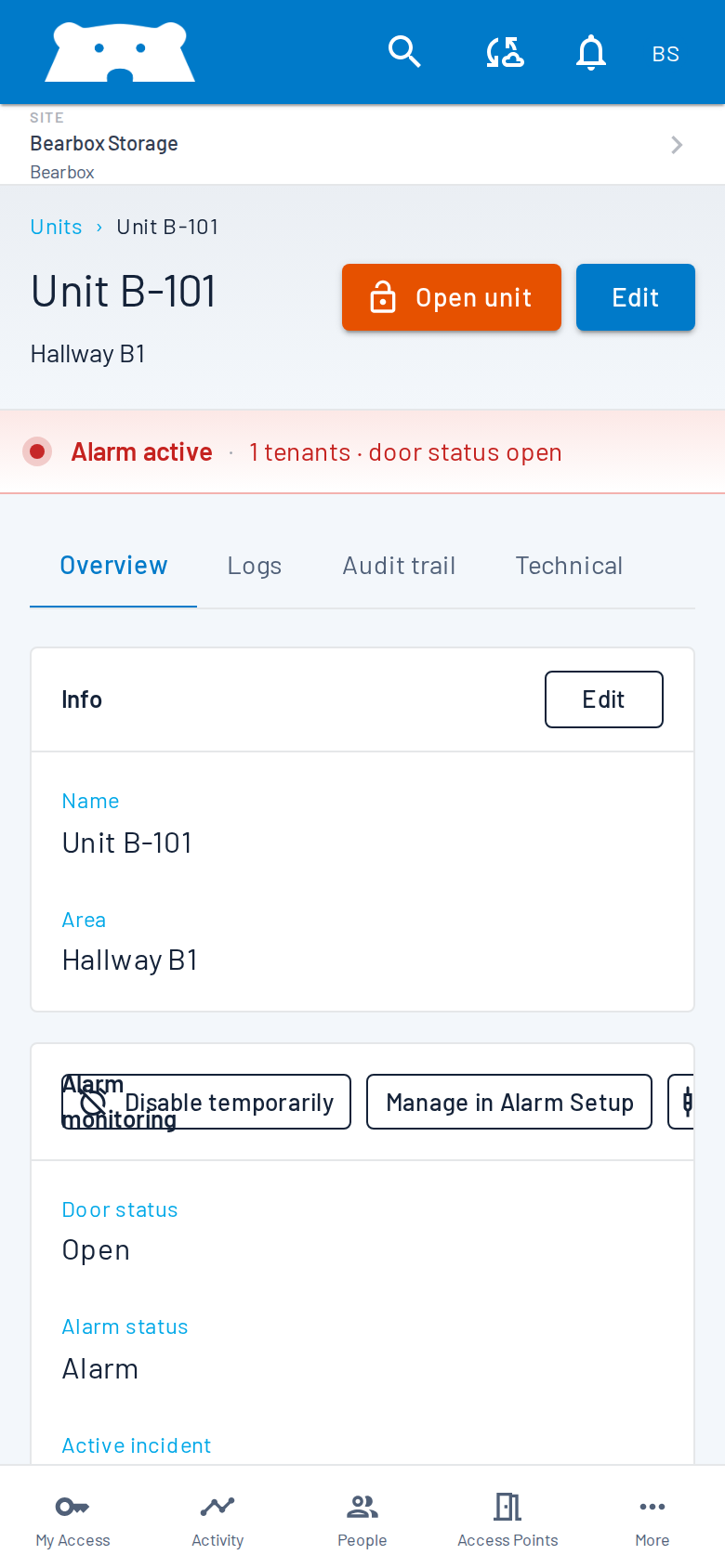
See doors, alarms and visits update as they happen. Manage sites, people and permissions from one place, with your branding.
Connect supported rental changes with site access, so your team has fewer permissions to update separately.
Explore rental software integrationsUse your own software to manage customers, change access and read site events through the Bearbox API.
Explore API integrationReview compatible readers and cabling for reuse when moving your site to Bearbox.
Explore existing-system upgradesLighting can follow customer visits too. Explore smart lighting
Keep customer access in step with rentals. Connect supported rental changes with site access, so your team has fewer permissions to update separately.
Explore integrationsYour software doesn’t need to be on this list.We can build a connection with your rental software. These are just a few of the providers we already integrate with.
Other integrations include Kinnovis, 6Storage, R6 Automate, Storman, Store365 and many more.
You don’t need every feature to get started.
Start with the access your customers need, then add monitoring, locks and site controls where useful. Local keypad and reader access can continue using permissions already held on site if the internet drops. Remote app access needs internet at the site and on the customer’s phone.
We’ll help you choose a setup around your customers, site layout and budget.
Show us your site and tell us what you want to make easier. We’ll walk you through the access, protection and software connections that fit.